提示
本篇文章持续更新中,以后对于博客的改动都将记录在此文章中
性能篇
随着不断的修改博客,添加的东西也越来越多,博客的访问速度也逐渐减慢。尤其是增加字体后,因为中文的字体文件十分巨大,导致加载一个字体文件都要3-4秒。遂进行性能优化。
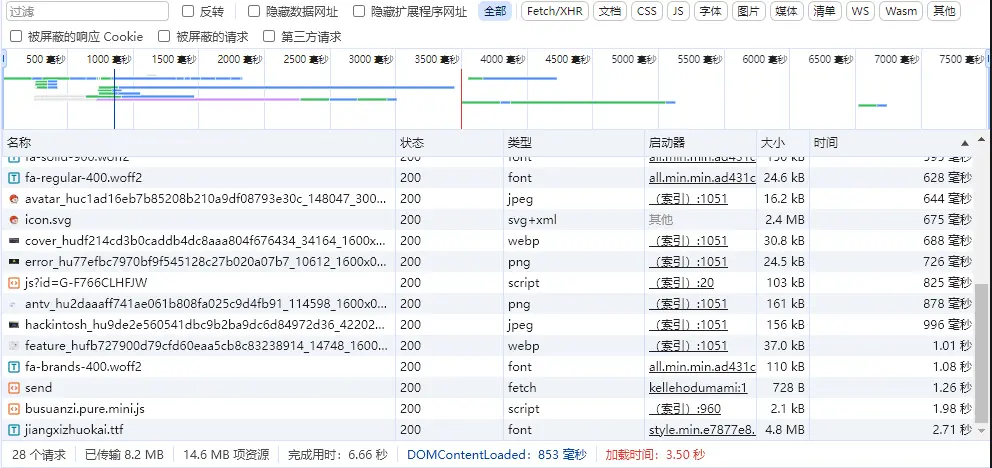
1.字体文件的精简
由于中文字体文件很大,把所有字体加载过来是一个耗时的操作,并且很多字体我们其实并没有用到,所以可以考虑只加载我们网站所用的字符部分。font-spider就是做这么一件事的工具。
https://github.com/aui/font-spider
安装font-spider
首先你需要有node环境,并且有npm包管理
使用
具体使用可以参考github仓库官方文档给的示例
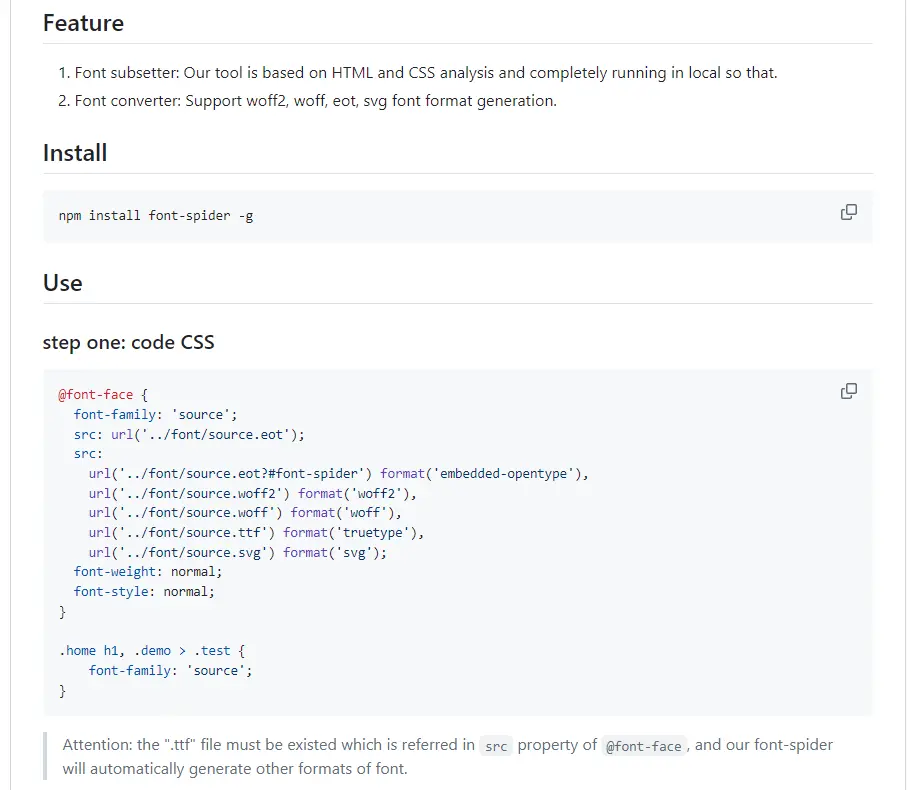
Hugo博客的便捷使用
因为官方示例是基础的使用,hugo博客怎么更便捷的使用是接下来要讨论的问题。
下面是适用于hugo博客使用font-spider的一些自动化脚本。主要原理:
- 通过
hugo命令在public目录下生成所有网页的html文件
- 通过python脚本读取所有的html页面的所有字符,并写到根目录下index.html文件的content div中
- 再通过font-spider 命令找出网站中所使用到的字符,font-spider生成的字体文件会在
font/目录下。这个文件是精简过后的文件
小工具的目录结构
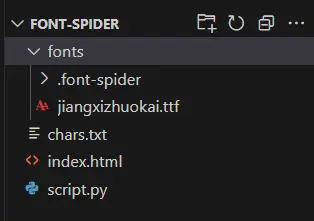
- 其中index.html的内容如下,jiangxizhuokai是本站使用的字体,在使用时请改成自己对应的,且将字体文件下载到本地放置在fonts目录下
 1
 2
 3
 4
 5
 6
 7
 8
 9
10
11
12
13
|
<div class="content">
</div>
<style>
    @font-face {
    font-family: 'jiangxizhuokai';
    src: url('fonts/jiangxizhuokai.ttf');
    font-weight: normal;
    font-style: normal;
    }
    .content{
        font-family: 'jiangxizhuokai';
    }
</style>
|
字体文件的font-face在themes\hugo-theme-stack-master\assets\scss\partials\base.scss中定义
- script.py内容如下,需要安装
beautifulsoup4这个库,这个文件就是把所有网页的html里面的字符写到上面的index.html的脚本。其中在运行完后char.txt中会存放当前网站所用到的所有字符,并在下次运行的时候进行比较,当字符集没变的时候,会打印出No new characters found, no update needed.这句话。(记得在main中更改网站生成的public路径)
 1
 2
 3
 4
 5
 6
 7
 8
 9
10
11
12
13
14
15
16
17
18
19
20
21
22
23
24
25
26
27
28
29
30
31
32
33
34
35
36
37
38
39
40
41
42
43
44
45
46
47
48
49
50
51
52
53
54
55
56
57
58
59
60
61
62
63
64
65
66
67
68
69
70
71
72
73
74
75
|
import os
from bs4 import BeautifulSoup

def extract_text_from_html(file_path):
    """Extract all unique characters from an HTML file."""
    char_set = set()
    try:
        with open(file_path, 'r', encoding='utf-8') as file:
            content = file.read()
            for char in content:
                char_set.add(char)
        return ''.join(sorted(char_set))
    except Exception as e:
        print(f"Error reading {file_path}: {e}")
        return ""

def collect_html_files(directory):
    """Recursively collect all HTML files in a directory."""
    html_files = []
    for root, _, files in os.walk(directory):
        for file in files:
            if file.endswith('.html'):
                html_files.append(os.path.join(root, file))
    print(f"Found HTML files: {html_files}")  # Debugging output
    return html_files

def main(input_directory, index_html_file, chars_file):
    """Main function to collect text from HTML files and write to a div in an HTML file."""
    html_files = collect_html_files(input_directory)
    new_chars_set = set()

    for html_file in html_files:
        text = extract_text_from_html(html_file)
        if text:
            new_chars_set.update(text)

    new_chars = ''.join(sorted(new_chars_set))

    try:
        # Read the existing character set from the file
        if os.path.exists(chars_file):
            with open(chars_file, 'r', encoding='utf-8') as file:
                old_chars = file.read()
        else:
            old_chars = ''

        # Check if the character set has changed
        if new_chars != old_chars:
            # Update the character set file
            with open(chars_file, 'w', encoding='utf-8') as file:
                file.write(new_chars)

            # Update the target HTML file
            with open(index_html_file, 'r', encoding='utf-8') as file:
                soup = BeautifulSoup(file, 'html.parser')

            content_div = soup.find('div', class_='content')
            if content_div:
                content_div.clear()  # Clear the existing content
                content_div.append(new_chars)

            with open(index_html_file, 'w', encoding='utf-8') as file:
                file.write(str(soup))
            print(f"Updated {index_html_file} with new characters.")
        else:
            print("No new characters found, no update needed.")

    except Exception as e:
        print(f"Error updating {index_html_file}: {e}")

if __name__ == "__main__":
    input_directory = "D:/Hugo/project/blog/public"  # Replace with your directory
    index_html_file = "./index.html"
    chars_file = "./chars.txt"
    main(input_directory, index_html_file, chars_file)
|
总结一下,上面需要做的步骤就是创建index.html和script.py文件,然后创建fonts文件夹并在其中放置字体文件。最后修改前面两个文件中相关的内容,运行script脚本后运行font-spider命令。
1
|
font-spider .\index.html
|
精简后的字体文件便在fonts目录下,并且会有一个.font-spider文件夹,这个文件夹是原始字体文件的备份。
2.CDN的使用
本站部分资源使用了免费的CDN方案:jsDelivr+Github。
参考链接: https://zhuanlan.zhihu.com/p/76951130
CDN的全称是Content Delivery Network,即内容分发网络。CDN是构建在网络之上的内容分发网络,依靠部署在各地的边缘服务器,通过中心平台的负载均衡、内容分发、调度等功能模块,使用户就近获取所需内容,降低网络拥塞,提高用户访问响应速度和命中率。CDN的关键技术主要有内容存储和分发技术。——百度百科
知乎. “免费CDN:jsDelivr+Github 使用方法” 知乎专栏, 2019, https://zhuanlan.zhihu.com/p/76951130.
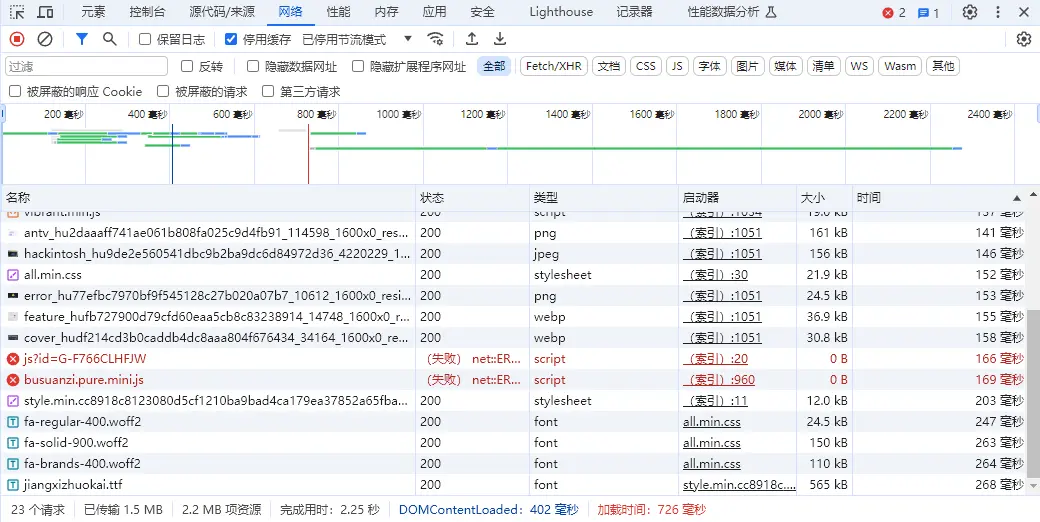
3.优化结果
经过上面两方面的优化,下面是本次优化的结果,关闭浏览器缓存后,多次刷新一般加载时间都是在600-700毫秒之间。congratulations!
功能篇
1.Moments的添加
具体请查看这篇博客Moments的添加
效果图: